Customer Lifecycle
The diagram below shows every state your account and memory instance can be in, and every transition between them. Use it as a reference when planning how to manage your subscription.
Full lifecycle diagram
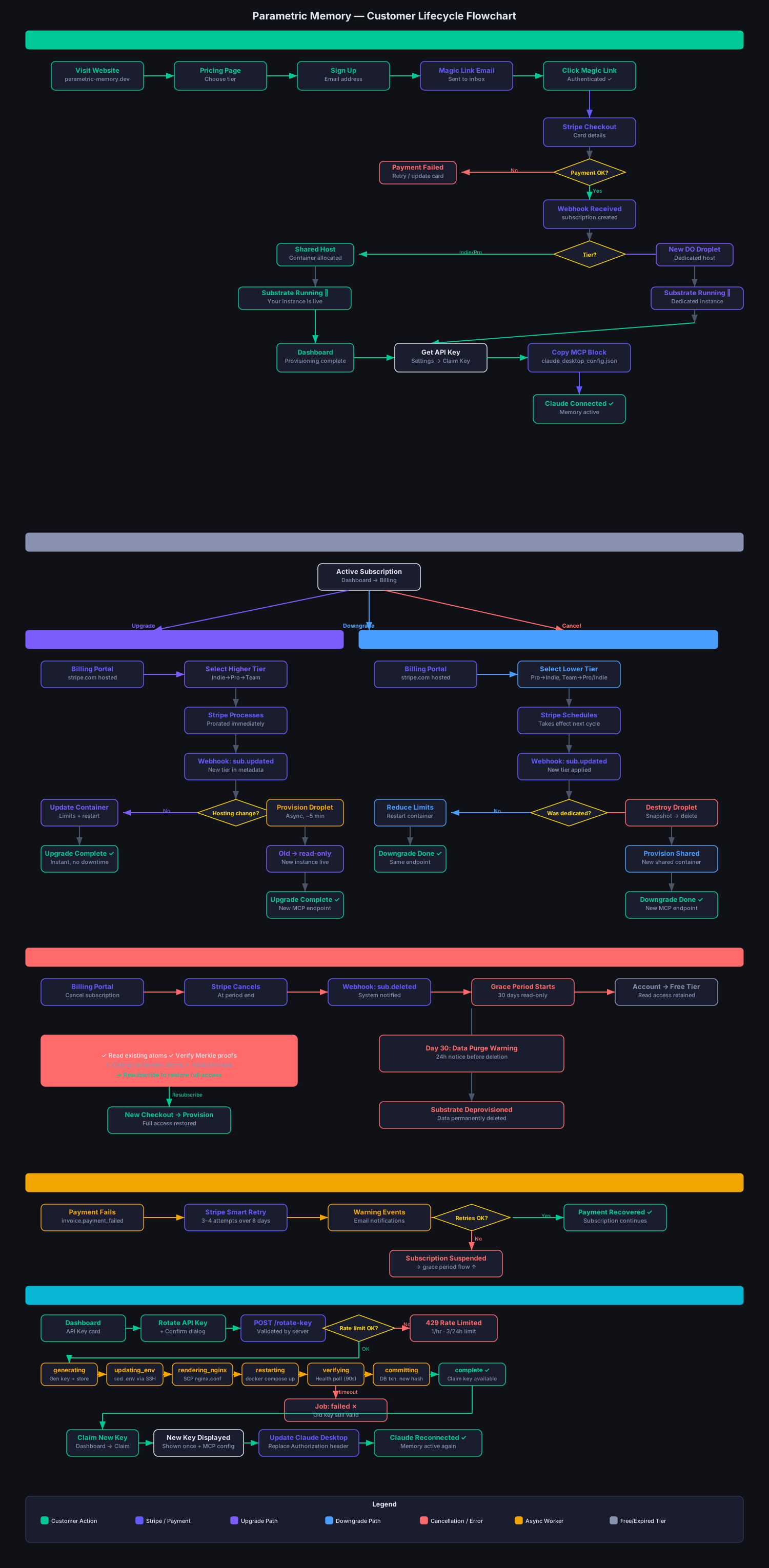
State descriptions
Account states
| State | Meaning |
|---|---|
pending_payment | Checkout started but not yet completed. Instance not yet provisioned. |
active | Subscription active and paying. Instance is running. |
past_due | Payment failed. Stripe is retrying. Instance stays running during retries. |
suspended | Payment failed after all retries exhausted. Instance paused. |
cancelled | Subscription cancelled. Instance runs to period end, then is deprovisioned and snapshotted. |
Instance (substrate) states
| State | Meaning |
|---|---|
provisioning | Being set up. Usually takes under 2 minutes (shared) or 5 minutes (dedicated). |
running | Fully operational. All read and write operations available. |
read_only | Temporary state during a tier-change migration (e.g. dedicated→shared). You can read existing atoms and verify proofs; you cannot write new atoms or call bootstraps. |
suspended | Paused due to billing issue. No API access until payment is resolved. |
deprovisioned | Instance destroyed at termination. A snapshot is kept 7 days for paid at-cost recovery, then permanently deleted. |
Key transitions explained
Signup → Running (~2 min)
You complete the Stripe Checkout. Stripe fires customer.subscription.created. Our system creates your substrate record and queues provisioning. A container (or dedicated droplet for Team) is started and registered with our routing layer. Once the health check passes, status becomes running.
Upgrade (e.g. Solo → Professional)
Stripe processes the upgrade immediately with proration. Our webhook handler queues a tier-change job. For shared-to-shared upgrades (Starter↔Solo↔Professional), the container is restarted with higher resource limits — this takes under 30 seconds with no data loss. For a shared-to-dedicated upgrade (any tier → Team), a new dedicated droplet is provisioned while your old container remains in read_only — once the new instance is live, it becomes your active endpoint.
Downgrade — not supported
Plans are upgrade-only. Moving to a lower tier returns downgrade_not_supported: a larger substrate cannot be fitted onto a smaller one without dropping atoms, and we do not delete your memory. If you need a smaller plan, export your atoms, cancel, and sign up fresh at the lower tier (see Downgrade Plan).
Cancellation → deprovision + snapshot
When you cancel, Stripe fires customer.subscription.deleted at the end of your billing period (or immediately if you cancel now). Your instance is deprovisioned and a point-in-time snapshot is taken — there is no read-only grace period. For 7 days after termination the snapshot may be recovered as a paid, at-cost service (quoted first, discretionary); after that it is permanently deleted.
Resubscription
Resubscribe at any time — your instance is re-provisioned from scratch and your atoms are not carried over. If you need to preserve your atoms, export them via the API before you cancel (see the Atoms API reference).
Provisioning reliability
If provisioning encounters an issue (network timeout, server unavailability), the system automatically retries. A provisioning job that has been processing for more than 15 minutes is considered stale and is requeued for a fresh attempt. You do not need to take any action — the retry happens transparently and your dashboard will continue to show "Provisioning" until the instance is ready.
Billing cycle
Your billing cycle starts on the day you first subscribe. For example, if you subscribe on the 10th of a month, you are billed on the 10th of each subsequent month. Upgrades are prorated immediately. Plans are upgrade-only — downgrades are not supported (see Downgrade Plan).